The Zencargo API Console
Note: You must have an active Zencargo account to follow this guide.
By far the easiest way to become familiar with Zencargo's API is using the embedded API console.
In order to correctly call the API, you'll need to format the GraphQL correctly in a HTTP request, authenticated using correct credentials. But none of this is required to use the API console, which is designed to give you a quick way to play around and uncover the syntax and schema required to interact with the Zencargo API.
To do this, head to your staging environment and log in. Your Zencargo Account Manager can help you with this if you do not yet have credentials. The API console is accessible from the sidebar.
Once you have the console open, you can construct queries or even mutations, making use of autocomplete and linting.
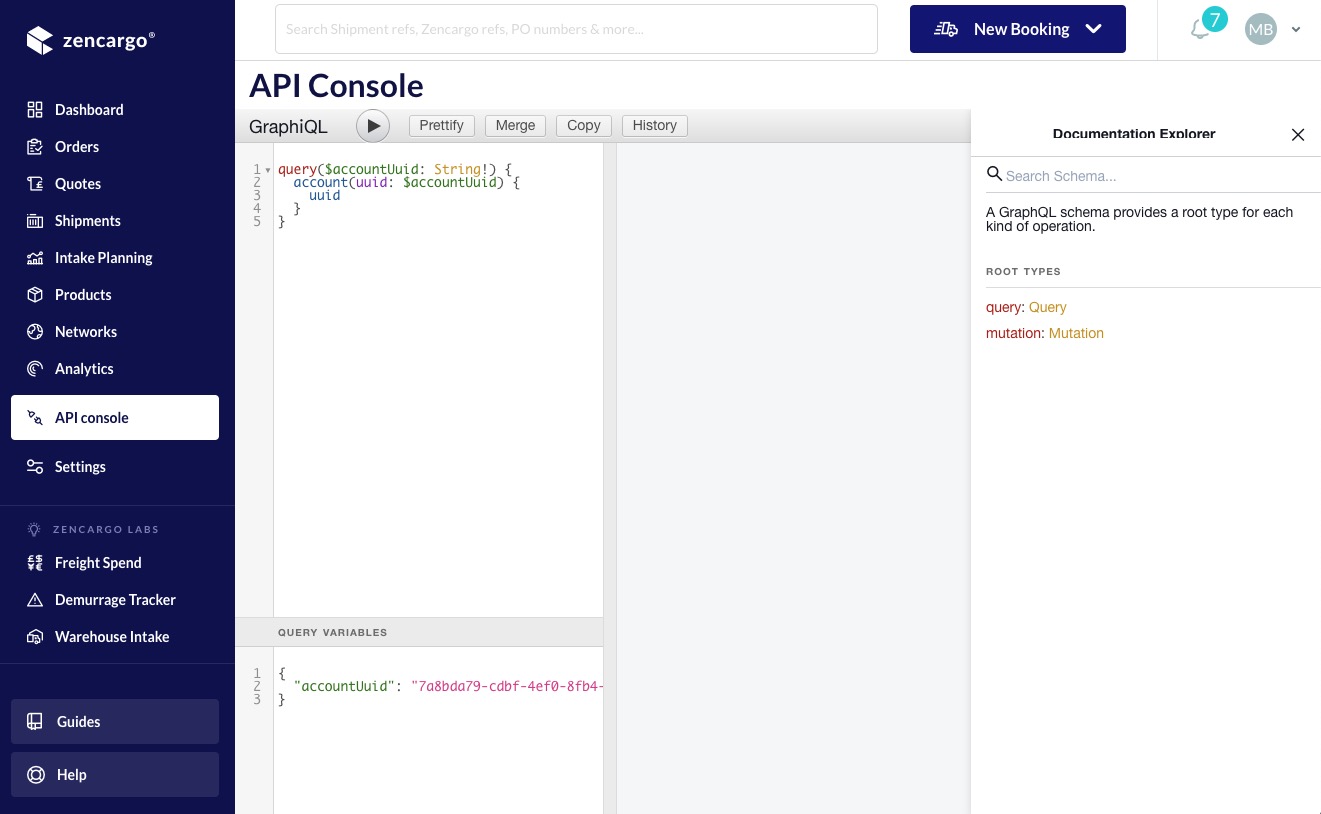
If you are unfamiliar with GraphQL, you will probably need to follow some of the guides in these API docs to begin to understand the syntax. The API console is a perfect place to use the examples in the guides, as you do not need to worry about anything other than the syntax and the variables: more often than not, you can copy and paste GraphQL into the query box and run the query to see what will be returned.
What's more, there are also docs on the full schema inside the API console itself, meaning you can often answer questions about schema fields without needing to leave the console.
If you're new to GraphQL, you might benefit from reading the series of guides that starts with your first GraphQL call.