Concepts
Zencargo has created a model of the supply chain built around providing SKU-level visibility and traceability. This means that, unlike many ERPs, we seek to track, for each product that is ordered, a model of:
- the original quantity ordered
- the original required delivery date
- the actual quantity fulfilled
- the latest delivery estimate
- why the original and the actuals differ
- who made changes, and when this occurred
You might find that this means that, for Purchase Orders in particular, Zencargo includes an 'extra' object for each line, compared to your ERP. This is known as a Lot. Many of your operations with the Zencargo API will involve querying or possibly even updating these Lots.
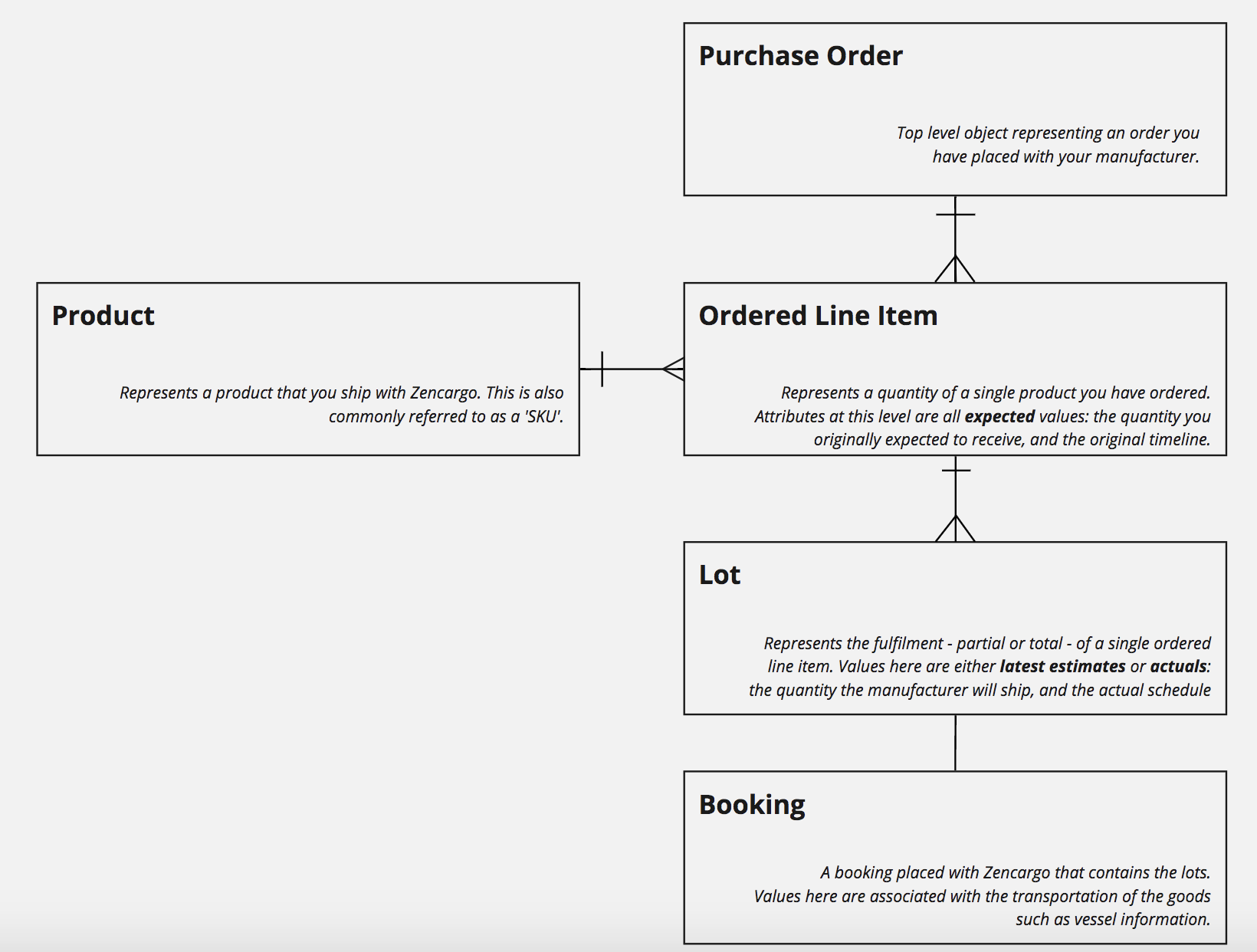
This diagram outlines, in its most basic form, how Zencargo models purchase orders and products.
Zencargo tracks Product-level data inside Lots, which are themselves tied many-to-one with OrderedLineItems. These are contained inside a PurchaseOrder. Lots exist before a booking, and are eventually what gets attached to a Booking as they are shipped.
An example order
The Bluth Company imports goods to the UK. On the 1st January 2020, they raise an order,
PO-SEAWARD-2, with their manufacturer. The order is for:
- 10,000 Frozen Bananas, equating to 32 cubic meters of cargo
- 50,000 Beads, equating to 38 cubic meters of cargo
The merchandising team need both items to deliver into their warehouse by 4th May 2020.
The goods are expected to ship by sea from their manufacturer in China to the UK.
In order to make it aboard the sailing that arrives in time, the manufacturer agrees to have the goods ready for pickup on 16th March 2020.
Naturally, there are many other data points required and available, but let's start with the basics first.
In Zencargo's model, this is a PurchaseOrder, and inside that is two OrderedLineItem objects - one for each 'line' on the PO.
Furthermore, as soon as you create this Purchase Order inside Zencargo, two Lot objects will be created automatically - one for each OrderedLineItem.
We'll cover how you could create this and query for it in later guides, but to illustrate the data model, here is how this data would be returned in a query or mutation result:
// Purchase Order Object
{
  "orderReferenceNumber": "PO-SEAWARD-2",
  "orderDate": "2020-01-01",
  "orderedLineItems": [
    // Each item in this array is an OrderedLineItem
    {
      "product": {
        "skuCode": "10000"
      },
      "quantityOrdered": 10000,
      "cbm": 32.0,
      "initialCargoReadyDate": "2020-03-16",
      "requiredDeliveryDate": "2020-05-04",
      "erpLineId": "YOUR_ERP_LINE_ID",
      "lots": [
        // Each item in this array is a Lot
        {
          "quantityFulfilled": 10000,
          "cbm": 32.0,
          "cargoReadyDate": {
            "date": "2020-03-16"
          },
          "estimatedDeliveryDate": "2020-05-04"
        }
      ]
    },
    {
      "product": {
        "skuCode": "20000"
      },
      "quantityOrdered": 50000,
      "cbm": 38.0,
      "initialCargoReadyDate": "2020-03-16",
      "requiredDeliveryDate": "2020-05-04",
      "erpLineId": "YOUR_ERP_LINE_ID",
      "lots": [
        {
          "quantityFulfilled": 50000,
          "cbm": 38.0,
          "cargoReadyDate": {
            "date": "2020-03-16"
          },
          "estimatedDeliveryDate": "2020-05-04"
        }
      ]
    }
  ],
}
The difference between Lots and OrderedLineItems
You will notice from our example that both an OrderedLineItem and a Lot were created from one line on a PurchaseOrder. You'll also probably notice that they contain very similar concepts - the initialCargoReadyDate and the cargoReadyDate on the OrderedLineItem and Lot respectively, for example - however, the nuance between the two is worth reiterating.
In simplistic terms, the difference between Lots and Ordered Line Items can be described like this:
- OrderedLineItems represent original expected information about a line on a PO
- Lots represent actual latest information about a line on a PO
To put it another way:
- OrderedLineItems are very often data that you know about a purchase order line
- Lots are very often data that Zencargo knows about a purchase order line.
It is highly likely that you will send Ordered Line Item data, and retrieve Lot data
This is because Zencargo is often - but not always - the system that manufacturers and origin teams use to update and book purchase orders. It is Lots that are being mutated and interacted with in this case.
Depending on your use case, you may also provide Zencargo with Lot updates yourself, most commonly if your merchandising and origin teams are entering data into your ERP first, and you're sending that over via API. In this case, the Lots are booked using Zencargo, and can still change on Zencargo when the packing list for the shipment is amended in our platform.
So, regardless of whether PO management is happening in your ERP, or on Zencargo, you will want to query for Lot information throughout the lifecycle of the shipment to keep your ERP in sync, and possibly notify warehousing and merchandising teams of changes and delays.
An example of divergence between the two
Let's take our example. When we raised the PO, we expected to receive a single consignment of 10000 Frozen Bananas, and we needed to have them delivered to us by the 4th May 2020.
Upon creation of the PO, Zencargo automatically created a Lot that matched the OrderedLineItem, as you can see from this fragment:
// Data present upon PO creation....
// Ordered line item
{
  "quantityOrdered": 10000,
  "requiredDeliveryDate": "2020-05-04",
  "lots": [
    // Lot
    {
      "quantityFulfilled": 10000,
      "estimatedDeliveryDate": "2020-05-04"
    }
  ]
},
It's common that, for a variety of reasons, we're going to receive less than this, and on a different date that we expected. Perhaps because some of the frozen bananas didn't pass Quality Assurance, which led to a delay in the shipment.
It is possible, using the Zencargo UI or API, to reflect the fact that the quantity being fulfilled is now only 9500, and the delivery will take place on the 10th of May.
Using our model, the OrderedLineItem associated with the Frozen Bananas would not change. But the Lot associated with them would change to reflect this. It would now look like this (again, a fragment only for illustrative purposes):
// Ordered line item
{
  "product": {
    "name": "Frozen Bananas"
  },
  "quantityOrdered": 10000,
  "requiredDeliveryDate": "2020-05-04", // is the same
  "lots": [
    // Lot
    {
      "quantityFulfilled": 9500,
      "estimatedDeliveryDate": "2020-05-10" // has changed
    }
  ]
}
Retaining information in this way is crucial for Zencargo to be able to offer On Time In Full reporting, and also allows for the final use case we'll explore: the fact that Lots can be split.
Splitting Lots
Another nuance between the two is that while an OrderedLineItem cannot be split, a Lot is designed to be split if the order is fulfilled in multiple shipments
Let's continue our example.
When we raise the PO, we expect to receive a single consignment of 50,000 Beads. A common occurrence is that something goes wrong during manufacturing.
As well as issues with Frozen Banana Quality Assurance, our manufacturer has a serious problem sourcing the dye needed for the Beads.
Because we need as many Beads as we can get, as soon as possible, we ask the manufacturer to ship whatever they have ready alongside the Frozen Bananas, and we'll receive the remainder later. They tell us that they have 22,400 Beads ready.
Using the Zencargo UI or the API, we can reflect this by splitting the Lot in two, to reflect the fact that there will now be two shipments of Beads. The changes to the model would look like this:
// Ordered line item
{
    "product": {
    "name": "Beads"
  },
  "quantityOrdered": 50000,
  "requiredDeliveryDate": "2020-05-04",
  "lots": [
    // Each object in this array is a Lot
    {
      "quantityFulfilled": 22400,
      "estimatedDeliveryDate": "2020-05-10"
    },
    {
      "quantityFulfilled": 27600,
      "estimatedDeliveryDate": "2020-06-10"
    }
  ]
}
As you can see in all of these examples, the OrderedLineItem generally does not change, unless for example your team makes a mistake or changes the actual quantity they order.
It is very common for the Lot to diverge from the OrderedLineItem, because the fulfilment of the Purchase Order does not proceed according to plan. It's also common for Lots to diverge from each other if the Purchse Order will be fulfilled in multiple shipments.
The final concept that we'll explain in this guide is the Booking, which is a wrapper around a Shipment, and is what a Lot is associated with.
Bookings
The Booking object contains information about a shipment of goods, optionally containing Lots.
In normal circumstances (an import shipment that Zencargo has received Purchase Orders for), the Zencargo UI allows manufacturers or origin teams to book a series of Lots. These Lots are enriched with information from the booking (such as the delivery estimate) and there are other fields you may find useful on the Booking object itself.
A full rundown of this is outside the scope of this guide, schema reference for Bookings can be found here, but we will look at a very simple example following on from our previous Beads example.
Recall that the manufacturer is going to ship two consignments of Beads, weeks apart. Once they have booked the first Lot using Zencargo, we will be able to retrieve information about the booking by querying the Lot again.
GraphQL allows us to query for fields that we are interested in, and we can include a booking field in any query we make about this Lot (more on how to do this later.) For now, just know that a query that included this would return this structure:
// ... Ordered Line Item
"lots": [
  // Each object in this array is a Lot
  {
    "id": "1e6a5ca1-d2b7-4c6e-a015-ca179f6d5c91",
    "quantityFulfilled": 22400,
    "estimatedDeliveryDate": "2020-05-10",
    "booking": {
      "modeOfTransport": "OCEAN",
      "stage": {
        "value": "DEPARTED_POL"
      },
      "zencargoReference": "ZBLUTH-589"
    }
  },
  {
    "id": "20ae1927-27d9-4d10-b08f-cfe009b8707f",,
    "quantityFulfilled": 27600,
    "estimatedDeliveryDate": "2020-06-10",
    "booking": null
  }
]
Here we can see the impact of only having booked only one of the two Lots that were split in the previous step. Our first Lot, which has been booked, now contains booking information such as the mode of transport and the stage.
When our booking's delivery estimate changes, perhaps because of a delay to the vessel, the estimatedDeliveryDate for that Lot will update - whilst the second Lot, which has not been booked, will retain its own unique estimatedDeliveryDate.
Using this model, it's possible for you to get a sense of exact quantities that are delivering, what is left over, and when that is due to arrive.
This ends our explanation of the core concepts of the Zencargo API.
Next Steps
- Creating Purchase Orders — Learn how to create purchase orders
- Querying Purchase Orders - Learn which PO data you can query from the Zencargo API
- Updating Purchase Orders - If you need to, learn to update PO data
- Querying Packing Lists - To learn about querying packing list data after bookings have been placed
- Making your first call - If you're not sure how GraphQL works, start here.